Open the report
Run Report Preflight from the Extensions menu in the active Google Slides presentation.
 Report Preflight
A final QA pass inside Google Slides
Find unresolved placeholders, stale reporting periods, missing sources, suspicious client names, and broken links—without leaving the deck.
Free during early validation. No separate Report Preflight account required.
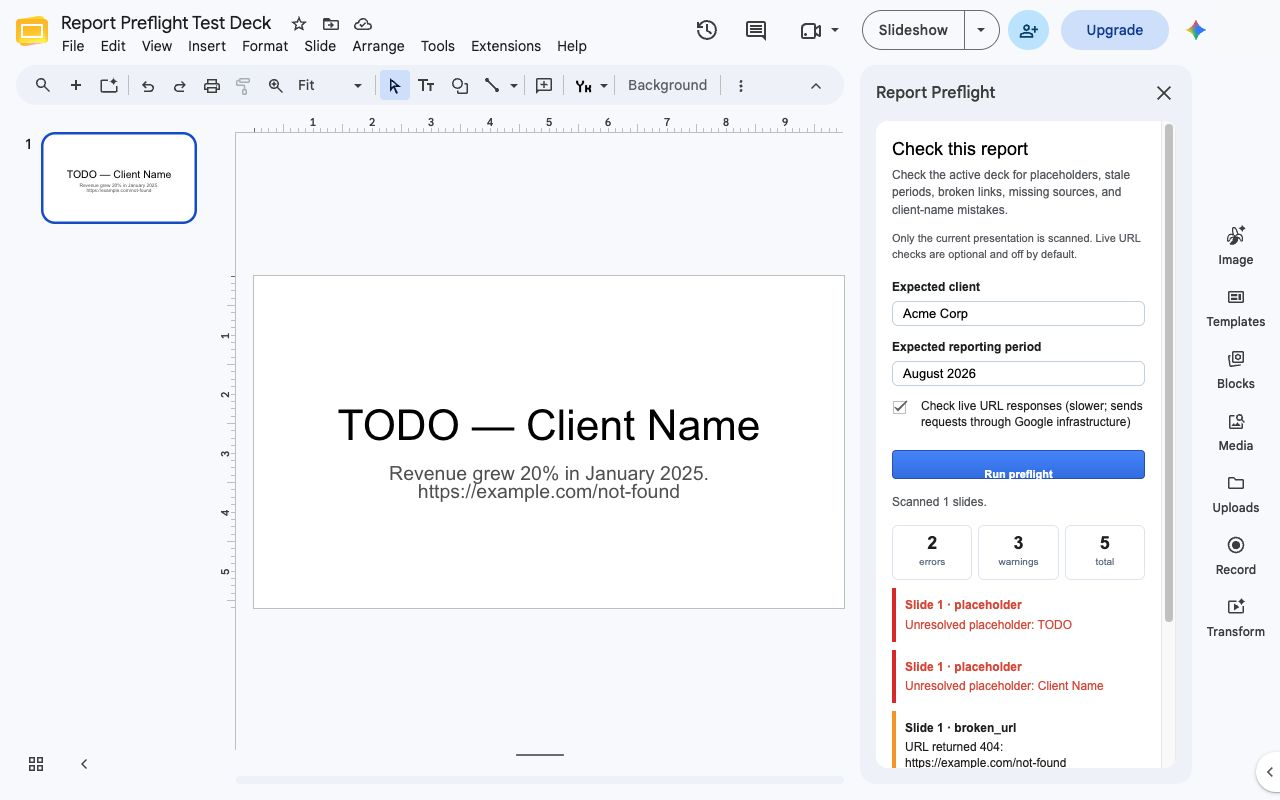
One scan, actionable results
Run Report Preflight from the Extensions menu in the active Google Slides presentation.
Optionally enter the expected client and reporting period. Live URL checks remain off unless you enable them.
Each finding identifies the affected slide and explains what deserves a final human review.
Designed for reporting teams
Privacy by default
Report Preflight reads only the presentation you actively open and scan. The current version does not store presentation text in an external database. Optional live-link checking is off by default.